

| English | Korean | Chinese | Japanese |
 Storage
Chapter 2. Configuration: Storage
Assign storage drives for video recording
1. Storage Pool
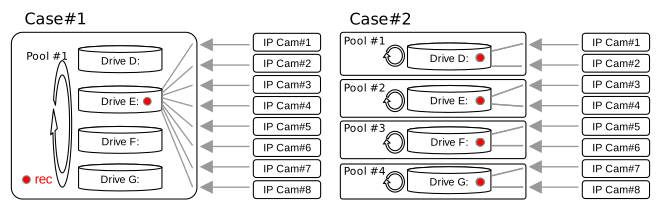
a. Define as many storage pools as you need. A storage pool consists of one or more drives and is assigned to each video channel for recording. You can create a single storage pool with all drives (case #1), or several storage pools with fewer drives each (case #2). By creating more storage pools, you can distribute and reduce the bandwidth load on individual physical storage devices.
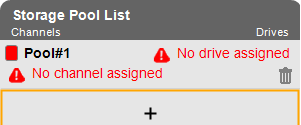
b. In the Storage Pool List, you can add a new storage pool by clicking the "+" cell, and remove one by clicking the trashcan icon.
2. Archive File Storage
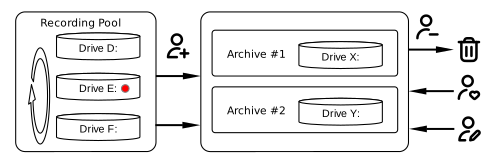
a. To enable file archiving, you must assign one or more drives for file archive use.
b. Unlike regular video recordings, a Video File Archive is never deleted automatically. It remains saved until the user intentionally removes it.
3. Drive List
a. Click a drive and select a Storage Pool or File Archive to assign it to.
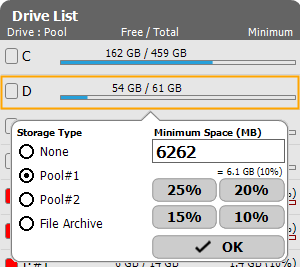
b. On Windows, it is strongly recommended not to use the C: drive, or any drive on the same physical disk as the C: drive, as a recording drive.
c. On Linux, it is strongly recommended not to use the system disk (the disk containing the root filesystem `/`) as a recording disk.
d. Also, define a minimum amount of space to be reserved for other applications while recording. (20% of the total space is recommended.)
4. Channel List
a. Click each channel and select a storage pool to assign.

b. Drive icons with an underline have video files for the corresponding channel. If video files exist outside the assigned storage pool, those files won’t be removed automatically. You will need to remove those files manually.
5. Recording File Structure: Video files are saved on the assigned drives as follows:
a. X:\_vms\video\CCCC\TTTTTTT-YYYYMMDD-hhmm-n.v
· X: drive letter
· CCCC: channel number set in Device setup (refer to the next section)
· TTTTTTT: Time zone-independent timestamp
· YYYYMMDD-hhmm: year, month, day, hour, and minute (same as server system time, which corresponds to its time zone and daylight saving time)
· n: file index, starting from zero (0). If a video block is split into two files due to insufficient drive space, the second file has an index of one (1).
b. Each video file contains video and audio data for one channel for one hour.
c. Video files for the same time range are saved on the same drive.
d. If the current recording drive runs out of space, recording moves to the next drive and continues.
e. If the last assigned drive runs out of space, recording returns to the first drive.
f. If the free space on the current recording drive falls below the minimum space, the oldest video files will be deleted to make room for new recordings.
 System
 Recording Schedule
 IP Device
 Channel Group
 Network
 User
User Event
Event Notifications
 MQTT
MQTT Misc.
Misc.