

| English | Korean | Chinese | Japanese |
Python Integration
Python Library: vmspy
By offering a Python library designed to retrieve video streams from VMS servers and report detections and events back to the server, you can harness the vast array of video-related AI resources available in cloud computing.
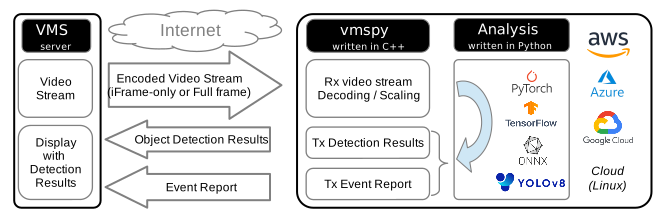
With straightforward yet robust APIs, you can effortlessly receive video streams from VMS servers.
import vmspy

live_video = vmspy.live_video()
live_video.start("address.of.vms", 3300, 1, 0, "xxxx", "xxxx")

while True:
    # Receive frame image and information from the VMS server
    (frame_image, frame_info) = live_video.get_frame()
    if analyze(frame_image):
        # Report event information back to the server
        live_video.report_event(frame_info, x=0.25, y=0.25, w=0.5, h=0.5,
                                duration=2, event_type_id=0, class_id=1, object_id=1)
Here is a comparison between the new vmspy library and the traditional method of receiving video using OpenCV:
| Aspect | OpenCV | vmspy |
| Stream | RTSP/RTP | proprietary protocol |
| Output Image Size | Not adjustable (same as original) |
Adjustable (to CNN input size) |
| Stream flow | Always full frame | Selectable: full/keyframe |
| Frame drops | Uncheckable | Displayed on VMS display |
| Detection | Difficult and tedious on cloud (ssh or collab) |
Displayed on VMS display |
Case Study: Street Parking Monitoring
By detecting vehicles in the video using TensorFlow object-detect API, VMS can identify cars that stay too long in a no-parking zone.