


| English | Korean | Chinese | Japanese |
Draw guide shapes for Analysis
Enter Video-editing
· In the playback mode, choose a channel and date and time, and click the video (  ) or image (
  ) export button.
· In the export dialog, click the `Edit` button to enter the video-edit mode.
Draw Shapes
· Draw some guide shapes. You can draw lines, rectangles, ellipses, and polygons. (The insides of shapes are not filled.)
· Please refer to the Video-editing part of the manual for more details.
Exporting Codes
· Click the button at the top of the shape list on the left to copy the Python code. If successful, you will see the message "Python codes for drawing shapes copied to clipboard."
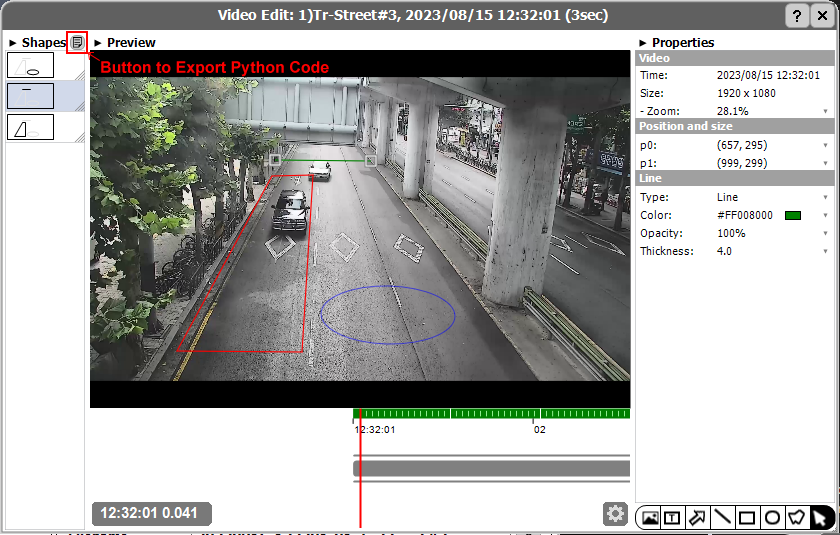
· Paste the codes to your python script.
# Example of drawing codes
polygon_0_points = [(0.337037, 0.326733),
    (0.412963, 0.323432),
    (0.392593, 0.907591),
    (0.161111, 0.904290)]
vms_video.drawPolygon(polygon_0_points, border_thickness=4.0, border_color="#FFFF0000")
vms_video.drawLine(0.342592, 0.273927, 0.177778, 0.003300, border_thickness=4.0, border_color="#FF008000")
vms_video.drawEllipse(0.427783, 0.689699, 0.248139, 0.191559, border_thickness=2.0, border_color="#FF0000FF")